
Kept
Creamy Baked Mac and Cheese
- 1 lb dried elbow pasta
- 1/2 cup unsalted butter
- 1/2 cup all purpose flour
- 1 1/2 cups whole milk
- 2 1/2 cups half and half
- Boil the pasta one minute short of al dente, then drain.
thechunkychef.com ↗
Free on iPhone and iPad · Now with Ember
Sift saves recipes from any website as ingredients and steps, and holds your screen awake while you cook. Now with Ember, the part of Sift that thinks about dinner with you.
Ember's daily picks are free, and so is everything Sift already did. Asking Ember what to cook is part of Sift Pro. Nothing about you is for sale.
Kept
Creamy Baked Mac and Cheese
thechunkychef.com ↗
Meet Ember
Open Sift and a sealed envelope is waiting on Home. Tap the seal. Six cards rise out of it, real recipes with real ratings, and each one says why it is there: because you cooked chicken 5 times, or because you said yes to a brisket in the deck.
Swipe yes and the card drops into your yes pile. Swipe no and Ember learns. A dish you touched never comes back, and one you ignored stays away for a month. The ranking runs on your phone and nothing goes to Ember's model for it. The only thing that leaves is a handful of search terms Sift uses to fetch the recipes, the same as typing them into Find.
Ember is the part of Sift that thinks about dinner with you. The picks are free, every day, for everyone.
Worth a look todaySee all
For Matt
Today’s six are in.
Open today’s picksYour yes pile
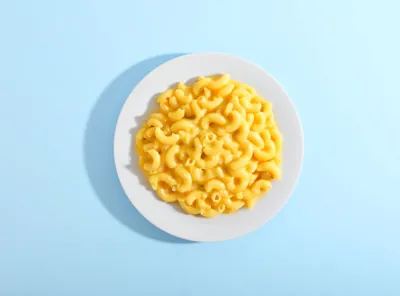 Creamy Baked Mac and Cheese35 min · thehungrykitchen.com
 One-Pot Creamy Pasta25 min · cooked
Tap the seal. Six cards come out, and every one says why it is there.
The whole thing
The phone screens are real recordings. The rest is drawn. It has music, off until you ask.
Safari extension
Turn the extension on once. After that a small bar appears the moment a page has a recipe on it, and one tap puts the ingredients and the steps on a clean card with a link back to whoever wrote it.
That is the whole business of saving a recipe from a website, done on the page you were already reading.
Nothing to copy, and no share sheet to fish through. I checked twelve apps in this category before building it and not one of them does this.
home / dinner / pasta / comfort food
Creamy Baked Mac and Cheese
 by Sarah · updated September 2026 · this post may contain affiliate links
Jump to Recipe ↓
by Sarah · updated September 2026 · this post may contain affiliate links
Jump to Recipe ↓
Growing up, my grandmother made this every single Sunday, and the smell of it coming out of the oven is still the first thing I think of when somebody says comfort food.
But before we get to the recipe, a little about the trip to Tuscany where I first tasted something like it, on a hillside outside Siena, in the rain.
We had been driving for hours and the light was going. My husband pulled over at a place with four tables and no menu, and what they brought out changed how I think about pasta entirely.
Anyway. The recipe is below, but first let me tell you about the cheese.
You want three kinds. I know that sounds like a lot. It is not a lot.
Cook this
Bigger type, checkable steps, and the screen stays on until you leave.
Ingredients
The bar arrives on its own. You were already on the page.
Ask Ember
A craving in your own words, or the ingredients sitting at home. Ember answers with five or six real dishes and a line on why each one fits, then narrows with you until one dinner is left. Tap it and Sift goes and finds the recipes.
Ember does not chat and it does not greet you. It answers with dishes, in the same dry voice as the rest of the app, and it never says I.
Ask Ember is part of Sift Pro. The daily picks above are free either way.
Search the internet
What are you in the mood for?
A craving in your own words, or the ingredients sitting at home. Then talk it through. Ember narrows the list with you until one dinner is left.
Something light, with the chicken thighs?
Thighs want skin-side heat and something sharp beside them. Five that stay light:
The piccata
Settled. Tap it to find recipes, or keep talking.
A short list, then one. Tap it to find recipes, or keep talking.
Cook Mode
Big type you can read from across the counter, with steps you tap off as you pass them. The screen stays on until you leave the recipe, with no trip into Settings to keep it awake.
So you are not nudging your phone with a knuckle every ninety seconds, hands covered in raw chicken, while it decides you have stopped paying attention.
Ingredients
Tap one as you add it.
Steps
Boil the pasta one minute short of al dente, then drain.
Melt the butter, whisk in the flour, cook one minute.
Tap an ingredient as you add it. Tap a step as you finish it.
Timers and the Lock Screen
When a step says smoke for sixteen hours, Sift reads that duration out of the sentence and turns it into a timer you start with one tap. It counts down on the Lock Screen and in the Dynamic Island with the app closed, named for the thing it is timing.
Stopping one takes two deliberate taps, because a stray touch in a dark kitchen should not be able to end a two-hour rest.
Force-quit the app halfway through and it does not matter. Come back and a bar offers to pick up exactly where you were, timer still counting.
 Sift
Sift
SIFT · now
The app is closed. The timer is not.
Optimize
Pick a goal: keto, low carb, paleo, or just lighter. Ember reworks the recipe in front of you and swaps only what the goal requires. When a swap costs you something it says so, since cauliflower is not pasta and the recipe should admit it.
The steps are rewritten to match and the macros are worked out again for the new version. Save it as a new recipe, or replace the original. Optimize is part of Sift Pro.
Cook this
Keto
Keto Baked Mac and Cheese
Pasta out, cauliflower in, and the roux goes. The cheese sauce stays as written.
2 heads cauliflower, cut into florets
Costs the chew. Roast the florets dry first or the sauce goes watery.4 oz cream cheese, softened
1 1/2 cups heavy cream
~610 cal · 24g protein · 9g carbs · 52g fat, estimated per serving
Reworked by Ember from this exact ingredient list.
Save as a new recipeThree swaps for keto. The first one says what it costs.
Macros
Calories, protein, carbs and fat, per serving. When the site publishes them you get the site's own figures, and the line says so. When it publishes nothing, one tap and Ember works them out from the ingredient list as written, and that line says so too. The estimate is free with an account.
MacrosEstimated by Ember, per serving
Compare
You open three versions of a dish, take the best idea out of each, and cook something that is now yours. Compare puts two of them next to each other, each column scrolling on its own.
Then it pulls out the places they disagree, which is the part you were squinting between two tabs to find.
Where these two disagree
The three extra on the right are gruyère, panko and dijon. Worth knowing before you are standing in the shop.
Then ask what actually differs. Ember reads both versions and writes the answer under the numbers: which one is richer and why, and what each difference does on the plate. The columns and the rust marks are free. Ember's answer is part of Sift Pro.
At a glance
Same dish, two ideas of it. The Hungry Kitchen's is the richer one; the other is the quicker weeknight sauce.
Written by Ember from these two exact recipes. Check amounts against the columns, then cook it your way.
Extraction
Sift reads a page four ways and stops at the first one that works. The last route is you pasting the text in yourself, which is why unsupported site is a message this app cannot produce. All four land on the same editable card. A clean parse just means you have nothing to fix.
schema.org/Recipe block most food sites already publish for Google.
All four end at the same clean, editable card.
The rest of it
Sift gives you the substitute, how much of it to use, and what changes if you do. Scaling works the same way. Take a recipe from half a batch up to 10x and every amount follows, fractions included.
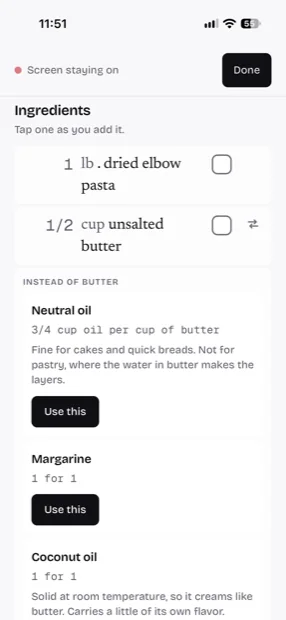
Saved recipes open with no connection at all. If you cook somewhere the wifi does not reach, that is worth more than anything else on this page.
Drag things into whatever order makes sense to you. Nothing sorts your library but you. See at a glance which ones you have actually cooked, and put your own photo on any recipe, because the stock shot never looks like the thing you made.
Creamy Baked Mac and Cheese35 min · cooked★ Texas Style Smoked Brisket16 hr★
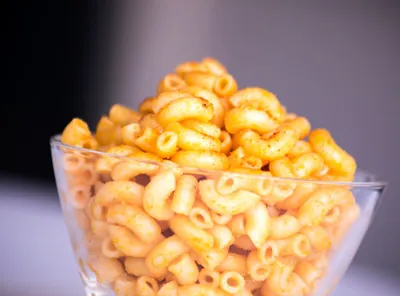 One-Pot Creamy Pasta25 min · cooked★Easy Weeknight Bake45 min★Cheesy Skillet Dinner30 min★
Most recipe searches hand back roundups and category pages. Sift filters on the structured data, so a page describing itself as a list of thirty recipes does not come back as one of them.
Search the internet
Texas Style Smoked Brisketheygrillhey.com · 16 hrSlow Cooker Beef Brisket with BBQ Saucerecipetineats.com · 8 hrOven Brisket, Start to Finishseriouseats.com · 5 hrBrisket Burnt Endsamazingribs.com · 12 hrOne button sends the recipe and its link anywhere. Or send only the ingredients, with the scaled amounts, into Reminders, Notes or a text message on the way to the shop.
Deleted the wrong thing. It happens at the end of a long day, with one hand. You have six seconds to take it back, and the countdown is visible the whole time rather than a bar that vanishes when you look away.
Where it loses
There is no grocery list and there is no meal planner. Of the twelve recipe apps I compared before building this, twelve have a grocery list and eleven have a weekly planner.
If either of those is the thing you actually need, one of them is a better answer than Sift, and I would rather say so on this page than have you find out on the second evening.
What you get instead: an ingredient list you can send into Reminders, Notes or a text message on the way to the shop, with the scaled amounts already worked out.
Saving from Safari, Cook Mode, timers, the library, sync between your devices, macros, Compare's columns and Ember's daily picks. All of it free, with no ads and no account needed to start. Twenty web searches a month are free as well, and after that Find runs on a catalog.
iPhone and iPad · iOS 17 and up
Sift Pro
Sift Pro adds Ask Ember, Optimize, Ember's written answer in Compare, and web search with no meter. Those are the four things that cost money to run every time you use them, and the four a casual cook reaches for last.
It is a subscription, monthly or yearly. The first time you try it the App Store gives you three days free, and the price is on the App Store in your own storefront's currency. Pro needs an account so the subscription has somewhere to land. Sign in with Apple or an emailed link, no password either way, and it takes a minute.
Everything else stays free. Nothing you already use moves behind it.
Ember runs on Sift's server and gets its answers from a language model at OpenAI. When you ask it something, what you typed, or the recipe in front of you, leaves your phone along with your diets and restrictions and a short note of what Sift has noticed about your cooking. Your name and email never go with it. Sift asks once before the first request. Daily picks are ranked on the phone. Fetching the recipes for them sends a few search terms to Sift's search provider, the same as a search in Find, and nothing to OpenAI. The privacy page has the field-by-field version.
The part of Sift that thinks about dinner with you. Every morning it picks six recipes for you and learns from what you swipe, and that is free. With Sift Pro it also answers when you ask what to cook, and reworks a recipe toward keto, low carb, paleo or lighter. In Compare it reads both versions and says what actually differs. It never says I and it never chats. It answers with dishes and numbers.
Yes, and I mean that as a promise. Extraction runs four levels deep and the last level is you pasting the text in, so there is no page it can refuse. On a site with clean structured data you get a finished card with nothing to fix. On a badly built one you may straighten out a line or two.
Not to use Sift. Open it and start saving. An account is free, and you need one for two things: your library on a second device, and anything Ember works out for you on the server, the macros estimate included. Sift Pro needs one too, so the subscription has somewhere to land. It is Sign in with Apple or an emailed link, so there is no password to forget.
Nothing, for everything on this page except the four things Sift Pro adds: Ask Ember, Optimize, Ember's answer in Compare, and web search with no meter. Pro is a subscription, monthly or yearly, with three days free the first time, and the App Store shows the price for your storefront. There are no ads either way.
For the daily picks, a few search terms go to Sift's search provider to fetch the recipes, the same as a search in Find. The ranking, and what Sift has noticed about your cooking, stays on the phone. Nothing goes to OpenAI for them. When you ask Ember something, what you typed and the recipe in front of you go to Sift's server with your diets and restrictions and a short note of what Sift has noticed about your cooking, and Sift's server passes that to a language model at OpenAI for the answer. Your name and email stay behind, and Sift asks once before the first request. The privacy page lists every field.
Yes. On iPad the ingredients sit beside the steps and stay put while you scroll the method, the way a recipe card leans against the wall while you work.
Not yet. Browser extensions are the next thing being built, which is the route that would reach Android and desktop. In the meantime app.siftapp.me opens in any browser and will save and cook a recipe, though the Safari extension, the Dynamic Island timers and the offline library are iOS only.
Every saved recipe keeps a link back to whoever wrote it, and Sift never republishes anything anywhere. It is a reader for a page you already opened, on a phone you already own.
It does. Durations found in the step text are scheduled as real local notifications, so a sixteen-hour timer fires whether or not Sift is running, and it counts down on the Lock Screen the whole time.
Turn on the Sift extension in Safari once, then open the recipe page the way you normally would. A bar appears at the bottom saying a recipe was found, and one tap saves it as ingredients and steps. There is no link to copy and no app to open first. If you are not on iOS, app.siftapp.me will save the same page in any browser for now, and browser extensions are the next thing being built. The longer version of this answer covers the other three ways and why recipe pages are padded to begin with.
That is the whole idea. Sift keeps the ingredients, the method and a link back to whoever wrote it, and leaves behind the introduction, the ads and the pop-ups. Nothing is republished anywhere. It is a reader for a page you already opened.
No, and that is the most common reason somebody picks a different recipe app. Twelve apps compared, including the ones that do it well. What it does instead is send the ingredient list, with the scaled amounts, into Reminders or Notes or a text message. That covers the trip to the shop for some people and not for others.
No. Eleven of the twelve apps I compared have a weekly planner, so if that is what you came for, one of them is the better answer.
Because iOS is doing what you told it to. Your display sleeps on a timer, and reading a recipe does not count as using the phone. Cook Mode holds a wake lock for as long as you are in the recipe, so the screen stays on without you changing the auto-lock setting and forgetting to change it back. More on why Auto-Lock does this and why setting it to Never is the wrong fix.
Open a saved recipe and pick a batch size, from half up to 10x, or type your own. Every amount follows, fractions included, and the scaled list is what gets shared if you send it to somebody.
One at a time, by pasting the text in or saving the page it came from. There is no bulk import from another recipe app yet.